
38 lines
2.0 KiB
Markdown
38 lines
2.0 KiB
Markdown
# Ultra Wide addons for Reshade
|
|
[](https://buymeacoffee.com/k4sh44)
|
|
|
|
This repository is dedicated on Ultra Wide addons for Reshade. It's dedicated on UI overlays.
|
|
They're intended to be used with my other Reshade project Core that build asi files which will mod the game in real time.
|
|
|
|
## Building
|
|
Download this repository. Open the .sln provided. Build the solution for release.
|
|
The solution has an x64 folder with Release in it. .addon files shoud be found there.
|
|
|
|
## Installation
|
|
Go to reshade.me and to download section. Download Reshade with addon support.
|
|
Be sure not to download the regular version or it will not work with my addons.
|
|
Install Reshade. When asked, specify the game's executable folder. Then choose the right API used by the game (DX10/11/12 or Vulkan). Mostly, modern games use DX11/12.
|
|
Go on with installer and choose eventually which effects you want to install (not necessary here).
|
|
|
|
Locate your game's executable folder. Place in it the .addon previously built corresponding to your game.
|
|
That's it.
|
|
|
|
Now start your game, Reshade should show it's welcoming message.
|
|
Wait a couple of seconds to Reshade succeeding in hooking game's API and hit the "Home" key.
|
|
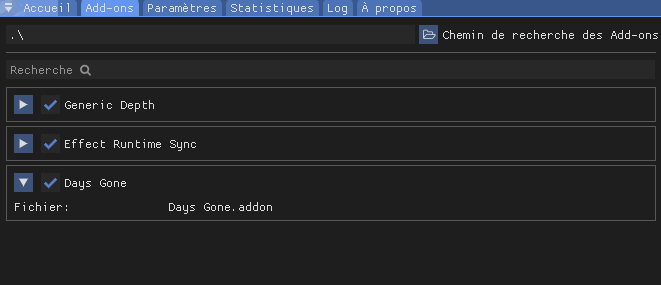
An overlay should draw on top of your game. Locate the addon tab and ensure my addon is listed and checked there (should be done automatically).
|
|
|
|
|
|
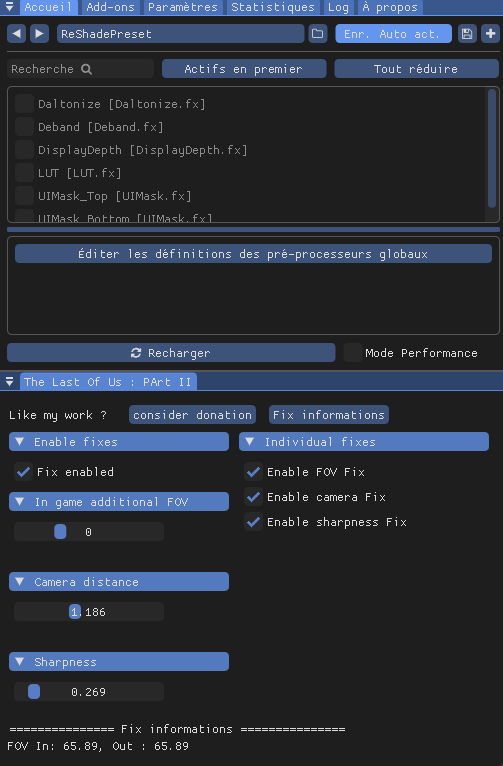
You may have to move main Reshade overlay around to see my plugin overlay.
|
|
It shoud looks like this :
|
|
|
|
|
|
Check the boxes and adjust sliders as desired.
|
|
At this point, this won't have any effect because core asi plugin is not installed yet.
|
|
Check my other project to see how to build and drop necessary files next your game's executable.
|
|
|
|
## Credits
|
|
This project use the following other projects :
|
|
|
|
[Reshade](https://github.com/crosire/reshade)
|
|
[Dear ImGui](https://github.com/ocornut/imgui)
|